

If you encounter an Oral-B electric toothbrush not spinning problem, don’t worry. We’ll fix it!
It’s frustrating when you turn on your Oral-B electric toothbrush and discover it’s not spinning as it should.
The error often indicates a malfunctioning motor or an issue with the brush head connection.
To fix your Oral-B electric toothbrush that is not spinning, clean around the power button and the underside of the brush head and metal shaft. If this doesn’t work, replace the brush head with a new one.
Alright, let’s move on to the solutions.
Oral-B Electric Toothbrush Not Spinning – Surefire Methods to Fix

There are several possible reasons why your Oral-B electric toothbrush is not spinning. Unmasking the culprit is crucial for pinpointing the best solutions.
Some of the most common causes include:
We searched everywhere for the most helpful steps to resolve the issue.
Here are the solutions we found, along with detailed instructions on how to perform them.
Before You Start

Before moving on to the listed solutions, we recommend following fundamental troubleshooting steps.
Sometimes, you deal with a minor problem that doesn’t demand advanced solutions.
- Fully charge the toothbrush for at least 24 hours
- Make sure the power outlet you’re using is working
- Don’t charge your toothbrush on a metal surface
- Don’t use too much pressure when brushing
If these don’t address the problem, proceed with the next solution.
1. Clean Around the Power Button

The simplest and easiest way to fix your Oral-B electric toothbrush if it’s not spinning is to clean around the power button.
Sometimes, toothpaste or dirt gets stuck around the button and causes it to malfunction. It also makes the button difficult to press.
Things you need:
- Warm water
- A damp cloth or cotton swab
- Dry cloth
To clean the power button, follow these steps:
- Turn off your Oral-B electric toothbrush.
- Remove the brush head from the handle.
- Run the handle under warm water for 10 seconds to loosen toothpaste or dirt.
- Clean the power button and the area around it using a damp cloth or cotton swab.
- Wipe the handle dry with a clean cloth.
- Reattach the brush head to the handle.
- Turn on your toothbrush and see if it’s spinning correctly.
Note: Incorporate regular cleaning around the power button into your oral care routine to prevent buildup, dirt, or debris.
2. Replace the Brush Head with a New One

Over time, the brush head’s bristles become frayed, bent, or missing, affecting your toothbrush’s rotation and cleaning performance.
Also, if the brush head doesn’t match your toothbrush model, it won’t fit and work well with the handle. To fix this, replace the brush head with a new one.
Here are the steps to do this:
- Turn off your toothbrush and remove the brush head from the handle.
- Dispose of the old brush head and take out a new one of its packaging.
- Align the new brush head with the handle and slide it onto the metal shaft.
- Push the new brush head into place until you hear a slight click.
- Turn on your toothbrush and see if it’s spinning correctly.
Tip: Align the brush head properly with your toothbrush model to ensure a snug fit. Also, give it a gentle twist to secure it in place.
3. Clean the Underside of the Brush Head and Metal Shaft

When the underside of the brush head and the metal shaft become dirty or clogged with toothpaste residue or debris, it causes your Oral-B toothbrush not to spin sometimes.
To fix this, give the underside of the brush head and metal shaft a thorough clean for optimal performance.
Things you need:
- A soft-bristled small brush or cotton swab
- A clean cloth
Here are the steps to do this:
- Turn off your toothbrush and remove the brush head from the handle.
- Rinse the brush head and the metal shaft under running water.
- Gently scrub them with a soft-bristled small brush or cotton swab to remove dirt.
- Wipe them dry with a clean cloth.
- Reattach the brush head to the handle.
- Turn on your toothbrush and see if it’s spinning correctly.
Note: We recommend using a mild, non-abrasive cleaner for a more thorough clean. But avoid harsh chemicals, which will damage the brush head and metal shaft.
4. Inspect the Brush Motor and Tighten It to the Base
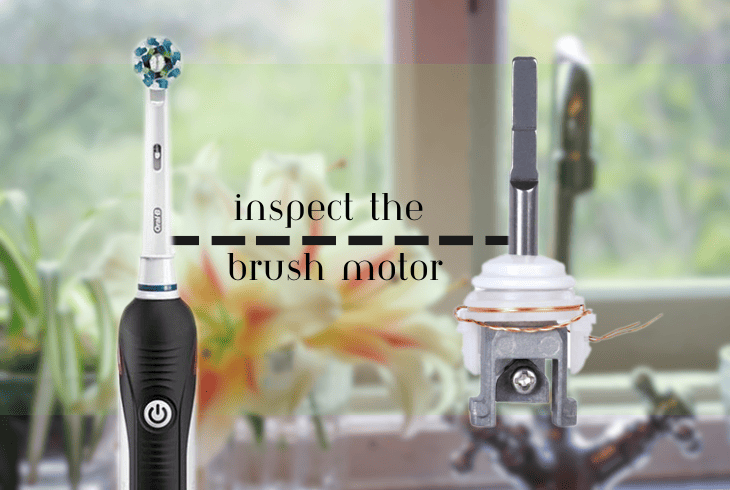
A loose or faulty brush motor is another cause of Oral B electric toothbrush head not spinning sometimes.
Since the brush motor connects the brush head to the handle and makes it rotate, your toothbrush won’t turn properly or at all if the brush motor is loose.
If faulty, it will stop working altogether or make a loud noise.
Things you need:
- A small screwdriver or coin
To inspect the brush motor and tighten it to the base, follow these steps:
- Turn off your toothbrush and remove the brush head from the handle.
- Locate the brush motor at the top of the handle and check if it’s loose or wobbly.
- If it is, tighten it to the base of the toothbrush handle.
- Insert the tip of the small screwdriver or coin into the bottom slot of the brush motor.
- Turn it clockwise until it is snug.
- Reattach the brush head to the handle.
- Turn on your toothbrush and see if it’s spinning correctly.
Note: Do not overtighten the brush motor to avoid damaging it or your toothbrush handle.
5. Disassemble Your Toothbrush and Get Rid of Moisture

Storing your toothbrush in a humid or wet environment, dropping it in water, or spilling liquid allows moisture to get inside the handle or brush motor.
This damages the electrical components of your toothbrush, preventing it from functioning properly.
To address the issue, disassemble your toothbrush and remove the moisture.
Things you need:
- A small screwdriver or coin
- Clean cloth or hair dryer
Here are the steps to do this:
- Turn off your toothbrush and remove the brush head from the handle.
- Take off the battery cover from the bottom of the handle with the screwdriver or coin.
- Take out the battery and set it aside.
- Gently pull out the brush motor from the handle.
- Dry the handle, battery, and brush motor with a clean cloth or hair dryer on low heat.
- Reassemble your toothbrush by reversing the steps above.
- Turn on your toothbrush and see if it’s spinning correctly.
Note: After assembly, store your Oral-B electric toothbrush in a dry area to prevent future moisture-related issues.
6. Reset Your Oral-B Toothbrush
If your Oral-B toothbrush still is not spinning properly after working on any of the above solutions, we recommend resetting it as a last resort.
It will erase any customizations or preferences you have made on your toothbrush, such as brushing modes or timer settings.
Resetting your toothbrush will also clear any errors or glitches preventing your toothbrush from working properly.
To reset your toothbrush, you’ll need to follow these steps:
- Turn off your toothbrush and remove the brush head from the handle.
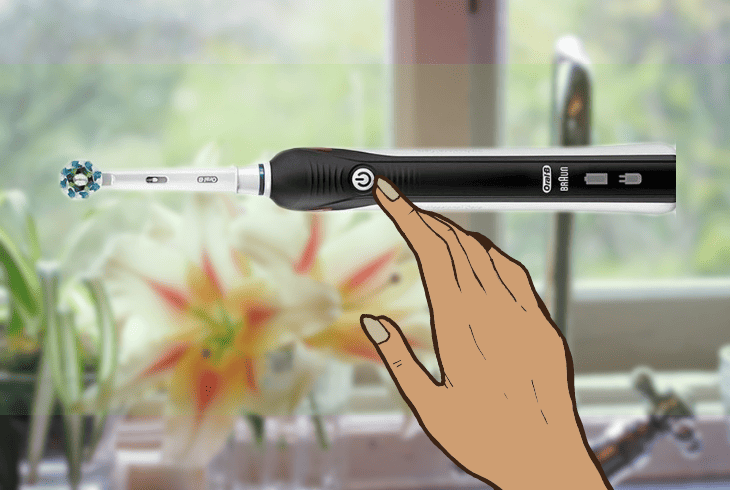
- Press and hold the power button for about 10 seconds.
- Wait for the green light on your toothbrush handle to light up.
- Release the power button and wait for a few seconds until the light turns off.
- Reattach the brush head to the handle and turn your toothbrush on.
- Check if your toothbrush is turned on and the motor is spinning.
Note: You’ll know that your toothbrush has reset since you’ll see the default settings on the display and hear the default sounds.
We recommend contacting Oral-B Support immediately if you need help with these steps. If your device is still under warranty, send it for repair or replacement.
Quick Recap
If your Oral-B electric toothbrush is not spinning, it’s a likely issue with the motor. We’ve covered the causes and solutions for this problem.
Inspect the motor and tighten it to get it spinning again, allowing you to brush your teeth.
If you’re having problems with your Oral-B toothbrush, read our blog for more troubleshooting steps!

- SimpliSafe Doorbell Not Flashing White? (Quick Fix Guide) - April 30, 2024
- SimpliSafe Keypad Out Of Range? (Proven Ways to Fix) - April 30, 2024
- Kasa Plug Change WiFi – (5 Easy-to-Follow Steps!) - April 30, 2024