

Vivint doorbell camera not working, and you have no idea how to fix it? Well, keep reading!
With its excellent monitoring features, the Vivint doorbell camera offers maximum security and alertness for all homeowners who have this revolutionary device.
If the doorbell has recently stopped responding or has glitched out, the issue is typically caused by battery or A/C issues.
To fix the Vivint doorbell camera, reconnect the terminal wires, soft reset the doorbell, and reinsert the backup battery. Also, check the positioning of the wall mount, reset the A/C power, and check the doorbell panel’s wiring.
There is much more, so let’s get started!
Why is My Vivint Doorbell Camera Not Working?
The Vivint doorbell could suddenly stop functioning due to an issue with the terminal wires or the backup battery.
Improper installation of the Vivint system could even lead to re-occurring issues with the monitoring, voice activity, and all smart functions of the Vivint doorbell camera.

Here’s a list containing all the causes of the malfunction of the doorbell camera:
Is Vivint Battery-Powered or Hard-Wired?
Although the doorbell has a backup battery, its primary power supply should be the terminal wires installed in the wall mount of the Vivint camera.
If there’s an issue with the “C” wire and the doorbell can no longer be powered adequately, it will automatically switch to the battery supply.
The Vivint doorbell cables are wired to a terminal panel supplied with power through the circuit breaker, allowing you to suspend the system’s power.
The backup battery typically lasts for 3-5 years before it has to be changed, so you may need to consider a full replacement in the future.
Note: The doorbell camera could also stop working if the backup battery runs out of power!
Vivint Doorbell Camera Not Working – Easy Solutions
It’s straightforward to fix camera issues with the Vivint Doorbell. Here’s how:
1. Soft Reset the Vivint Doorbell

You can address typical, non-lasting issues with the Vivint doorbell by performing a soft reset on the device and rebooting the operating system.
The standard Vivint doorbell and the Vivint Pro have identical “Home” and “Action” buttons, allowing similar operation, so here are the steps:
How to Soft Reset Standard Vivint Doorbell?
- Hold the “Home” button on the Vivint’s front panel.
- After that, release the button after 7-10 seconds.
- Press the “Home” button three times to reboot it.
How to Soft Reset Vivint Doorbell Pro?

- Locate the Action button on the doorbell’s front panel.
- Hold the button for 10-15 seconds without releasing it.
- Stop holding once Vivint’s LED indicator turns yellow.
Note: Do not release the doorbell’s button early!
2. Inspect Vivint’s Terminal Wires
As already established, the Vivint doorbell camera can withdraw electricity from two instances, enabling a dual, hybrid power supply for the device.
However, the primary electricity source that the Vivint doorbell cannot function without is the “C” terminal wires wired up to the breaker.

Here’s how to access and inspect Vivint’s terminal wires in easy steps:
- Gently pull the faceplate to remove it from the doorbell.
- Deactivate the doorbell’s power at the circuit breaker.
- After that, uninstall the mourning bracket from the wall.
- Next, gently pull the ground wires and “C” wires from the wall.
- Uninstall the wires from the polarity poles on the bracket.
- Reinstall the terminal wires after waiting for 30 seconds.
Verifying that you have deactivated the system’s power supply at the allocated circuit breaker switch is crucial.
Touching the wires unprotected with active voltage could lead to severe harm.
Alert: Contact a technician if the ground or “C” wire seems defective!
3. Reinsert the Rechargeable Battery

If the Vivint doorbell is still not turning on, the issue could be caused by a fault with the device’s rechargeable battery positioned internally behind the camera.
Upon failure of the terminal supply, the backup battery will activate automatically to power the Vivint doorbell, and if this doesn’t happen, the device won’t work.
Here’s how to reinsert the internal battery of your Vivint doorbell camera:
- Remove the faceplate from the Vivint doorbell camera.
- Take off the doorbell’s base from the mounting bracket.
- Access the battery compartment underneath the base.
- Eject the battery from the socket and wait 10 seconds.
- Reposition the battery back into the socket to power it on.
- Then, rebuild the doorbell camera and test the operation.
Note: The Vivint doorbell uses two CR2032 batteries!
4. Re-Adjust the Doorbell Wall Mount

Positioning the wall mount of the Vivint doorbell improperly can apply pressure to some of the wires and cause them to wear out, leading to serious malfunction of the doorbell.
So, the next step is to adjust the elevation and positioning of the wall mount to restore Vivint’s functionality.
Here’s how to re-adjust the wall mount of your Vivint doorbell camera:
- Remove the faceplate of the Vivint doorbell from the bracket.
- Now, undo the screws holding the mounting bracket intact.
- Next, re-adjust the mounting bracket so it aligns with the wall.
If the mounting bracket does not align well, the faceplate of the Vivint doorbell will not fixate with the holders properly, causing friction between all components.
If this doesn’t help, keep reading!
5. Check the Doorbell’s Chime Wiring
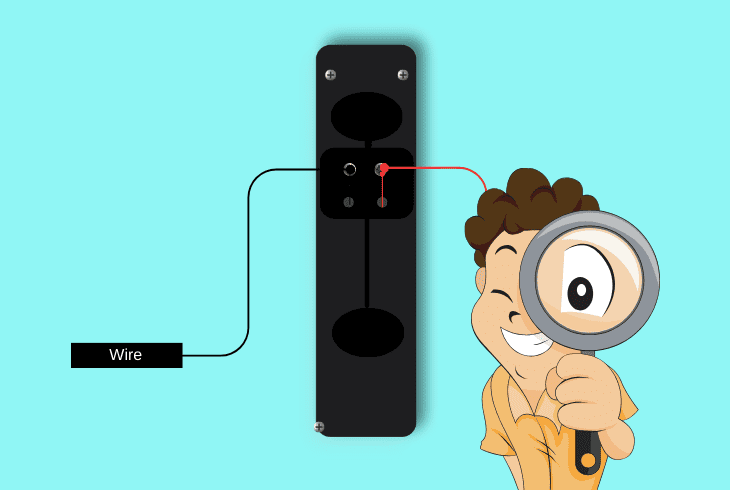
The standard Vivint doorbell and the Vivint doorbell Pro have identical hard-wiring lined through the electrical poles of a chime box.
The wires coming out of the wall and spacing through the wall mount of your Vivint doorbell are installed in a power panel that connects with the breaker.
Here’s how to inspect the chime wiring of your Vivint doorbell camera:
- Locate the doorbell chime terminal inside or outside of your home.
- Deactivate the power to the circuit breaker from the breaker panel.
- Next, access the doorbell terminal by pushing the flap towards you.
- Remove the Vivint doorbell wires from the terminals within the box.
- After that, inspect the Vivint’s wires for potential defects or damages.
- Reinstall the wires of the doorbell around the power poles of the box.
- Turn on the doorbell’s power supply at the circuit breaker and test.
All doorbells typically have an identical terminal power supply consisting of two wires; each wire has the purpose of delivering electricity.
The “C” wire, which is the voltage-positive wire, is red, and the “G” wire (ground wire) stabilizes and neutralizes the voltage.
Alert: A “C” wire defect could cause the Vivint doorbell camera to stop working!
6. Reset Vivint’s Circuit Breaker

As established earlier, Vivint’s system has its breaker, and you can deactivate the power supply of your doorbell camera at any time.
Temporarily suspending the A/C of your doorbell is an excellent solution to power or hardware issues of the Vivint and can restore functionality.
Here’s how to power reset the Vivint doorbell at the circuit breaker:
- Access the circuit breaker panel inside or outside of your home.
- Next, open the panel and locate the “Doorbell” switch on the table.
- Push the switch downwards slowly to deactivate the doorbell A/C.
- Next, wait for 30 seconds while Vivint’s power supply is deactivated.
- Gently push the breaker’s switch upwards to turn on the A/C power.
Note: A tripped circuit breaker could lead to a complete outage of your Vivint doorbell’s camera!
7. Factory Reset the Vivint Doorbell

You can manage your Vivint equipment, configure the settings, adjust the volume, and initiate a factory reset through the Vivint indoor tablet.
The Vivint indoor tablet is the center of your security system, and you can restore the doorbell to default settings through the menu in quick steps.
This is one of the most efficient ways to solve issues with the camera, so let’s wrap up the solutions by following the factory reset instructions.
Here’s how to factory reset the Vivint doorbell via the indoor security tablet:
- Verify that the Vivint indoor tablet is working correctly.
- Next, press on the three dots icon at the bottom right.
- Tap “Devices” underneath “SMART HOME SETTINGS.”
- Enter the PIN to gain access to all of your Vivint devices.
- Select “Cameras” and then press on “doorbell camera.”
- After that, scroll down and tap “Restore camera defaults.”
- Confirm the factory reset prompt to start Vivint’s reset.
After confirming the factory reset procedure, your Vivint doorbell will temporarily deactivate and enter the factory reset mode.
After the doorbell reboots, use the indoor panel to configure the camera settings and restore all necessary settings.
Important: Do not interact with the doorbell while it is still resetting!
Quick Recap:
To fix whenever the Vivint doorbell camera not working, inspect the terminal wires, check the chime box, and reset the circuit breaker.
If the fault persists, re-install Vivint’s internal battery and factory reset the doorbell.
Follow us for more!
